- On app.italic.com and in Italic for Mac’s window (live on the web):
- Expand Clips inline on Home: Clicking a Clip now expands it cleanly inside the Home row—showing the full text, inline Edit, Copy, linked Open task, Ask in Chat, and Open for its standalone page—instead of opening a full-height side panel. Memos continue opening in the side panel.
Italic Changelog
Product updates, firmware builds, and v2 API releases across Italic.
Showing 30 of 444 releases
- On app.italic.com and in Italic for Mac’s window (live on the web):
- Restored Clip and Memo icons: Switched Clips back to the document icon (
doc.text) and Memos back to the waveform icon (waveform) across Home, Search, Chat, and connected apps.
- Restored Clip and Memo icons: Switched Clips back to the document icon (
- Matching Clip and Memo icons for Italic for iPhone will arrive in the next TestFlight and App Store update.
1.0.83
1.0.83
Published to Italic’s stable firmware catalog; not installed on our test Glyph yet.
- Redesigned full-screen recorder. Recording a Memo or Clip now fills the screen and hides the bottom tab bar, showing a top-right status pill (REC, PAUSED, SAVING, and elapsed time while live words are shown), a top-right trash button on Memos to confirm Discard or Keep recording, a pinned audio waveform, and large Pause / Resume and Save buttons (or RELEASE TO SAVE CLIP for Clips).
- Calm offline recording and live serif transcript. When recording without live words from Italic, the screen shows a large elapsed timer with Saving on Glyph and Transcribes after sync; as soon as live words arrive from your iPhone, it switches automatically to a full-height live transcript in Italic Serif.
- Cleaner About screen. Removes the redundant mark from Settings → About and moves Model, Version, Serial, Safety, and update rows higher on the page.
- Verified on computer models. Passes build, font, flash-config, formal safety, host, and emulator checks, and matches the updated recorder and About screens in the simulator; physical hardware checks on Glyph are pending.
- Compact delta updates. Signed delta updates are published over Bluetooth from
1.0.66through1.0.82, and over Wi-Fi from1.0.68through1.0.82.
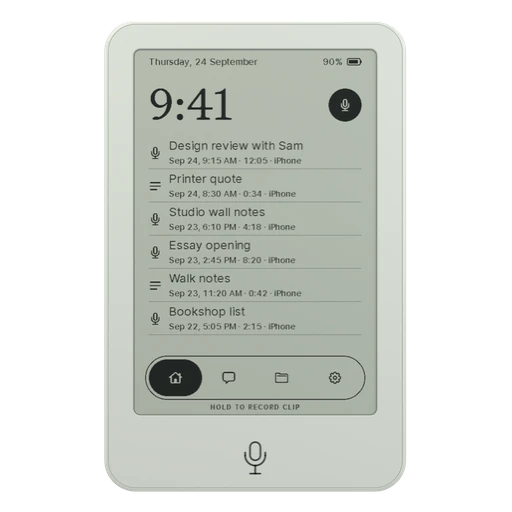
Glyph1.0.83
Hold Mic → Clip · Triple-press Mic → Memo · Hold on Chat → Ask- Distributed to TestFlight External Testers (
1.0.390, in Apple beta review; testers receive it once Apple approves it). - Configure paired computers & phones on every device: Each device's Paired devices settings section lists every iPhone and Mac paired to it with Use here / Switch and Forget actions (including single-slot Ring Bluetooth pairing removal when your Ring is docked, or Forget all other Bluetooth pairings on Ring… right in the same section).
- Cleaner background Bluetooth behavior: Stops unbonded iPhones from automatically requesting background pairing windows on passive link refusals, and responds immediately when tapping a Mac pairing notification.
- Released to every Mac through the app's updater (and app.italic.com/v1/mac/download).
- Ring onboard flash-buffer sync: When you record on Sudo while disconnected from all devices and later return to your Mac first, Italic for Mac now downloads, transcribes, deduplicates, saves/uploads, and safely clears buffered Ring recordings automatically without auto-pasting stale buffered clips into your active window.
- Toggleable live text streaming: Enable Stream text live in Personalization → Clips on this Mac (or the menu bar panel) to smoothly type each finished phrase as you speak with your Ring instead of pasting once at the end.
- More reliable live dictation & auto-paste: Fixes mid-recording dictation clipping across natural speaking pauses, installs Apple’s on-device Speech assets automatically in the background, and improves Accessibility focus detection across Electron and web apps.
- Faster, less fragile Mac pairing & device switching: Tries direct Bluetooth connection right away, keeps the pairing session open longer for macOS’s
Connection Requestprompt, names the helper iPhone in pairing status, nudges the helper phone after 8 seconds, and supports Paired devices remote switching, per-host Forget, and docked single-slot Ring bond revocation. - Sidebar shortcut (
⌘\) & Permissions checklist: Includes View → Toggle Sidebar (⌘\) and the Permissions on this Mac checklist in onboarding and Settings.
Italic for Mac windowExplore the Mac window, menu bar panel, and recording sync controls.
- On app.italic.com, in Italic for Mac’s window, and in Italic’s backend (live on the web):
- Paired computers & phones on every device: Devices rows and device detail pages now show every paired iPhone and Mac with active status, one-click Use here / Switch handoff, and per-host Forget (including persistent unpair notifications when an offline device reconnects).
- Stream text live setting: Added Stream text live under Settings → Personalization → Clips on this Mac.
- On app.italic.com and in Italic for Mac’s window (live on the web):
- Seamless storage key migration: Migrated browser storage for theme preference, sync cursors, and local memo chats from legacy
sudo-*keys toitalic-*, automatically carrying over your existing saved preferences and local chat history. - Consistent tokens and icons: Unified the landing page and update banner styling on shared theme tokens, unified built-in device and connector metadata, and aligned Clip, Memo, and transcript condition icons.
- Seamless storage key migration: Migrated browser storage for theme preference, sync cursors, and local memo chats from legacy
- Coming in the next Italic for iPhone release:
- Unified icons and cleaner cards: Aligned Clip, Memo, and hardware device icons with Italic’s shared catalog and removed redundant trailing chevrons from clickable Home, citation, clip handoff, onboarding, and connector cards.
- On app.italic.com/download, app.italic.com, in Italic for Mac’s window, and in the API (live when pushed):
- Direct iPhone App Store link on
/downloadand the landing page: app.italic.com/download and the landing page now link Italic for iPhone directly to the App Store alongside Italic for Mac, while keeping the waitlist strictly for upcoming hardware (Sudo 1,Dex, andGlyph). - Default Chat models order matches Auto routing: Unless you’ve set a custom order, Settings → Personalization → Chat models and the Chat composer menu now list models in Auto’s default priority order (GPT-6 Luna, DeepSeek V4.1 Flash 1017, Claude Haiku 5.5, Inkling 2 Small, Gemini 4 Hydrogen, Qwen 3.8 27B, and GLM 5.3).
- Downloads and Legal page polish: Settings → Downloads now displays matching Apple icons on the iPhone and Mac buttons and shows Installed (or Check for updates) instead of a DMG download link when viewed inside Italic for Mac, and Settings → Legal rows now match the uniform height and external-link styling used across Settings.
- Direct iPhone App Store link on
- Coming in the next Italic for Mac release:
- Sidebar keyboard shortcut (
⌘\): Adds View → Toggle Sidebar (⌘\) to collapse or reopen the sidebar from the menu bar or keyboard. - Onboarding Permissions checklist: Adds an interactive Permissions checklist during Mac setup—alongside Permissions on this Mac in Settings—so Bluetooth, Speech Recognition, Accessibility, and Notifications status can be checked and opened in System Settings in one place.
- Sidebar keyboard shortcut (
- On app.italic.com and in Italic for Mac’s window (live on the web):
- Dedicated Devices sidebar section: Moved Devices out of Workspace into its own sidebar section listing saved devices directly, complete with live Mac connection indicators and per-device firmware update badges (collapsing to a single Devices icon with the combined update count).
- Inline Mac device controls: Devices connected to or nearby your Mac now show their live status pill and actions (
Release,Use here,Pair,Update Glyph,Reinstall) directly on their saved device rows on the Devices page, leaving Connected to this Mac for unsaved or unconfigured nearby hardware. - Cleaner clickable rows: Removed redundant trailing chevrons from clickable rows across Devices, Connectors, Settings, and Chat.
- On app.italic.com, in Italic for Mac’s window, and in the API (live):
- Settings → Downloads (and
/v1/iphone/download) now links directly to Italic for iPhone on the App Store instead of the TestFlight beta. - Reorderable Chat models for Auto routing: Settings → Personalization → Chat models now lets you drag models into your preferred order with the same uniform row height as Agents, setting both Auto’s routing order and the Chat composer menu order.
- Settings → Downloads (and
Chat and approval draftsTry preset questions, inspect connected app lookups, and review draft approvals.
- On app.italic.com and in Italic for Mac’s window (live on the web):
- Revised Clip & Memo icons: Clips use the document icon (
doc.text) and Memos use the waveform icon (waveform) across Home, Chat, and connected apps. - Unified Home rows: Home Clip and Memo rows share iPhone’s two-column layout with top-aligned type tiles, pixel-locked hover checkboxes, two-line Clips without the repeated
"Clip"subtitle, capture time aligned to the headline baseline, and device, length, and location metadata tucked quietly below. - Polished Chat & Task handoffs: Left-aligned
"Ask a follow-up…"in the chat composer, matched Reply button styling to Copy, framed settled task handoff cards in Chat, and upgraded answered questions, Open task, and View receipt buttons into clean pill controls.
- Revised Clip & Memo icons: Clips use the document icon (
- Matching Clip/Memo icons and framed task handoff polish on iPhone will arrive in the next TestFlight build.
- On app.italic.com and in Italic for Mac’s window (live on the web):
- Moved the sidebar toggle button on Mac into the sidebar header beside the wordmark—becoming the first icon at the top of the collapsed rail—with a thin hairline border so the sidebar can always be reopened.
- On app.italic.com and in Italic for Mac’s window (live on the web):
- Firmware status and update actions on Devices: Each hardware device’s page now includes a Firmware section showing its reported installed version, update status, release notes, and the matching update action for the device (USB updater on Mac for Glyph and 3rd Party boards, web USB installer on Chrome/Edge, or iPhone handoff copy).
- Devices sidebar badge: The Devices item in the sidebar and device list rows now show a badge and update indicator whenever a saved device has a newer firmware release available.
- Matching Mac firmware reporting from Italic for Mac and iPhone firmware tracking and tab badge updates will arrive in the next Mac release and TestFlight build.
- Distributed to TestFlight External Testers (
1.0.389, in Apple beta review; testers receive it once Apple approves it). - Multipoint Sudo handoff and live dictation: Supports Sudo 1.0.146 multipoint connections across up to three Italic devices (iPhones and Macs), adds Use on this iPhone handoff and standby gating without re-pairing, coordinates assisted pairing windows over Italic’s relay, streams live dictation alongside Sudo’s on-ring backup, and keeps custom device names readable in diagnostic logs and synced recordings.
- Devices page parity: Includes the new Mobile section in Devices for connecting multiple iPhones, Apple icons beside Get Italic for Mac and Get Italic for iPhone, and Pebble Index 01 and Pocket listed first under 3rd Party.
- Released to every Mac through the app's updater (and app.italic.com/v1/mac/download).
- Direct Sudo dictation and multi-device handoff on Mac: Pairs over Bluetooth with Sudo 1.0.146, switches active ownership cleanly with Use here and Release, transcribes and pastes live Sudo dictation on your Mac with on-ring backup fallback, and reports active Mac device holders across your account and local-device registry.
- Updated Go menu shortcuts: Matches the web sidebar shortcuts with ⌘K for Search and ⌘1–⌘7 for Home through Devices.
- On app.italic.com, in Italic for Mac’s window, and in Italic’s backend (live on the web):
- Connected to this Mac on Devices: When running Italic for Mac
0.5.9, Devices (and Add device) shows USB and nearby/connected Bluetooth hardware in a Connected to this Mac section with inline Pair, Use here, Release, and setup controls, and marks Mac-held devices in your device list. - Account-wide holder and pairing-window coordination: Tracks which iPhone or Mac actively holds each device (across Sudo, Glyph, Dex, Pebble Index 01, Pocket, and external boards) and relays assisted pairing requests between signed-in devices.
- Connected to this Mac on Devices: When running Italic for Mac
- On app.italic.com and in Italic for Mac’s window (live on the web):
- Other devices at the top of Sessions: In Settings → Security, Other devices (Sign out other devices) now sits right below the current session at the top of Sessions.
- Restored Mac sidebar rail and full-height divider: In Italic for Mac’s window, the expanded sidebar divider continues cleanly to the top edge of the window and the sidebar toggle returns to the top bar beside the macOS window controls.
- Search stays on ⌘K / ⌘F: Removed ⌘2 from Search so ⌘K (or ⌘F) opens Search while ⌘1–⌘7 switch Home, Chat, Tasks, Connectors, Workflows, Dictation, and Devices.
- Borderless Profile header: Removed the card container around the header at the top of Profile.
- Matching Go menu shortcut updates (
⌘Kfor Search,⌘1–⌘7for pages) will ship with the next Italic for Mac release. - Matching iPhone updates—the borderless Profile header, Sign Out Other Devices… at the top of Sessions, and unified Home recording rows with a leading type tile and top-right capture time—will arrive with the next TestFlight build.
- On app.italic.com and in Italic for Mac’s window (live on the web):
- Mobile section and Apple icons on Devices: Devices now includes a dedicated Mobile section with Get Italic for iPhone (for connecting multiple iPhones to one account) and shows the Apple icon beside both Get Italic for Mac and Get Italic for iPhone.
- Pebble Index 01 and Pocket first under 3rd Party: In Devices (and Add device), Pebble Index 01 and Pocket now appear at the top of the 3rd Party list.
- Faster web app: Migrated the signed-in web app to compiled StyleX CSS (removing runtime utility stylesheets), switched to TanStack Redact with React Compiler, and enabled intent-based route preloading and code splitting for smaller downloads and faster navigation.
- The matching iPhone Devices updates—including the Mobile section for multiple iPhones, the Apple icon beside Get Italic for Mac and Get Italic for iPhone, and Pebble Index 01 and Pocket at the top of 3rd Party—will arrive with the next TestFlight build.
Devices and 3rd Party catalogBrowse Italic hardware and all 13 supported third-party boards with live gesture previews.
- Distributed to TestFlight External Testers (
1.0.388, in Apple beta review; testers receive it once Apple approves it). TestFlight builds now appear as Italic Beta with a blue Liquid GlassIapp icon to distinguish the beta from the release app, keeping the adaptive Light/Dark WordmarkIdesign andIcursor loading indicator.
- Released to every Mac through the app's updater (and app.italic.com/v1/mac/download). Switches Italic for Mac to the adaptive Light/Dark Wordmark
ILiquid Glass app icon, adds adaptive Light/Dark Welcome and Dock icons, and adopts theIcursor loading indicator.
- Distributed to TestFlight External Testers (
1.0.387, in Apple beta review; testers receive it once Apple approves it). Switches Italic for iPhone to the adaptive Light/Dark WordmarkILiquid Glass app icon syncing automatically with iPhone appearance, and replaces the origami loader with theIcursor loading indicator.
- On app.italic.com, docs.italic.com, app.italic.com/devices, Italic emails, and Italic's MCP server (live on the web):
- Switched the app icon and favicon tile from dark-by-default to an adaptive Light/Dark
I: deep#17211dFoundry-CleanIon#fafafa/#f6f6f6in Light mode and default plugin/store icons, flipping automatically to#f6f6f6Ion#141414in Dark mode (while keeping the foundry-cleaned1081 × 296wordmark). - Replaced the 4-flap origami loading indicator with the
Icursor loader: the Foundry-CleanIglides into a-15°italic slant, performs a subtle caret blink, and returns upright.
- Switched the app icon and favicon tile from dark-by-default to an adaptive Light/Dark
- Released matching native updates in Italic for Mac
0.5.8(35) and App387(1.0.387) on TestFlight, and submitted updated plugin packages and icons for review in the ChatGPT (1.0.8), Claude (1.0.3), Cursor (1.0.3), and Notion directories.
API keys and request builderSelect scopes and expiry to generate live v2 API cURL commands.
- Distributed to TestFlight External Testers (
1.0.386, in Apple beta review; you can install it once Apple approves it). It brings the Dark MonolithILiquid Glass app icon (Light, Dark, Clear, and Tinted) and foundry-cleaned wordmark, the native Liquid Glass tab bar and refracting Ask Italic composer, beveled squircle cards and tabular Italic Serif Profile stats, tighter inline text highlights, focused one-level Chat reply threads and persistent Tasks conversations (Chat with this task…), and the polished Italic Serif 4.000 font across iPhone titles.
- Released to every Mac through the app's updater (and app.italic.com/v1/mac/download). Brings the Dark Monolith
ILiquid Glass app icon, centered menu barIicon, foundry-cleanedITALICwordmark, global shortcuts (Toggle menu bar and Quick Search), tighter inline text highlights, and polished Italic Serif 4.000 across bundled screens.
- On app.italic.com, docs.italic.com, app.italic.com/devices, Italic emails, and Italic's MCP server (live on the web):
- Rolled out the Dark Monolith app icon and brand mark—an off-white glass
Icentered on a deep#17211dmonolith tile (#141414in dark mode)—across favicons, sharp marks, lockups, emails, and ChatGPT/Claude/Cursor plugin assets, while keeping the 4-flap origami loading animation intact. - Updated the Italic wordmark to the foundry-cleaned
1081 × 296vector artwork across web headers, docs, store, emails (110 × 30/440 × 120PNGs), and native assets.
- Rolled out the Dark Monolith app icon and brand mark—an off-white glass
- Matching native Dark Monolith Solid Liquid Glass app icons (light, dark, clear, and tinted), centered menu bar
Iicons, and foundry-cleaned wordmark assets are in Italic for Mac0.5.7(34) and App 386 on TestFlight.
- Live in the Italic API:
GET /devicesreturns custom and default names: Each device now includesdefaultNameandcustomNamealongsidename(the custom name when renamed, otherwisedefaultName).- Recordings carry
deviceNameand canonicaldeviceId: Recordings returned by/recordingsendpoints now includedeviceName(preserving the device's name even if the device was later removed), resolve hardware devicedeviceIdvalues to the account's canonical device ID fromGET /devices, and support filtering by thatdeviceIdonGET /recordings?deviceId=….
curl -s "https://api.italic.com/v2/devices" -H "Authorization: Bearer $ITALIC_API_KEY"{
"devices": [
{
"id": "dev_01jd8x7k9m2p",
"kind": "sudo",
"name": "Morning Ring",
"defaultName": "Sudo",
"customName": "Morning Ring",
"firmwareVersion": "1.0.143"
}
]
}1.0.147
1.0.147
Stable since November 24, and installs automatically.
- Buzz and blue light flashes when your Ring switches devices. When Sudo changes its active owner between paired iPhones or Macs (including automatic handoff when walking out of range), it plays a brief haptic pulse and two quick blue flashes so you can feel and see the handoff. Routine wakeups and same-device reconnects stay quiet, and ongoing recordings and firmware updates always keep priority.
- Keeps all Sudo 1.0.146 features, settings, and pairings unchanged.
- Verified on a computer and in formal model checks — physical acceptance testing on a Ring is still pending.
- Installs automatically from Sudo 1.0.138 or later with Italic app build 373 or later, after its recordings have synced. You can also install it from the Firmware update screen (both factory and earlier Rings have a signed update package). Sync first, because updating erases recordings still on the Ring.
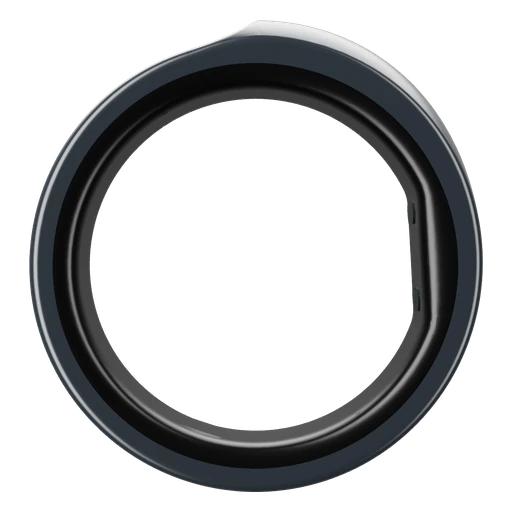
Sudo1.0.147
Press and hold → Clip (0.25 s) · Tap gestures off until enabled1.0.146
1.0.146
Stable since November 24, and installs automatically.
- Stay connected to up to three paired Italic devices at once. Pair Sudo with up to three devices (such as two iPhones and a Mac) and hand off cleanly between them without re-pairing or leaving an older host stuck in standby.
- Stream live audio while you record. Sudo streams audio live to the active Italic app alongside its on-ring backup copy, and clears live-audio backlog cleanly when Bluetooth finishes sending a packet.
- Safer handoffs, protected uploads, and steadier standby power. Prevents removing an active host's pairing while updating, recording, or syncing, keeps per-device notification state and packet limits isolated across three connections, prevents background host changes from interrupting an active sync, keeps standby power savings intact, and avoids leaving an unowned live stream stuck open. Verified on a computer and in formal model checks — physical battery and multi-device acceptance on a Ring are still pending.
- Keeps your existing settings and pairings unchanged.
- Installs automatically from Sudo 1.0.138 or later with Italic app build 373 or later, after its recordings have synced. You can also install it from the Firmware update screen (both factory and earlier Rings have a signed update package). Sync first, because updating erases recordings still on the Ring.
1.0.145
1.0.145
Test build.
- More reliable battery life, multi-device connections, and live dictation. Fixes an issue that kept Sudo's Bluetooth task awake when connected to multiple devices, trims background latency and per-connection radio window size across three active connections, and spaces out live-audio retries when the Bluetooth link is busy. Verified on a computer — we haven't measured battery life or multi-device dictation on a Ring yet, so this should reduce mid-recording drops, command timeouts, and standby drain.
- Keeps all Sudo 1.0.144 features, settings, and pairings unchanged.
- Appears in Firmware update when Test builds is turned on, with an Italic app build that supports Sudo 1.0.144 or later (both factory and earlier Rings have a signed update package). Sync first, because updating erases recordings still on the Ring.