3rd Party Devices
Use supported hardware from Core Devices, FoloToy, Waveshare, M5Stack and Espressif with Italic over Bluetooth or Italic Live firmware.
The 3rd Party section includes hardware made by other companies: both direct-Bluetooth devices that run their manufacturer's firmware—such as Pebble Index 01—and 13 boards that run Italic Live firmware from Italic. Every Italic Live board supports one-click USB-C installation in Italic for Mac or in Chrome or Edge at the web installer directory, direct .bin firmware downloads (both full factory USB images and wireless BLE OTA images), and wireless Bluetooth updates from Italic on your iPhone.
Once you pair a supported 3rd Party device with your iPhone (installing Italic Live first on supported boards), it works with Italic alongside Sudo, Dex and Glyph. Capture Clips and Memos, adjust its settings on its device page, and see every recording on Home under the device's name. (For a device running your own software that sends recordings through the API instead, see Custom Devices.)
Supported devices
Italic supports direct-Bluetooth hardware (Pebble Index 01 and Pocket) alongside 13 boards running Italic Live firmware from ShopItalic/external: 10 with screens and 3 screenless voice devices. See Device compatibility for the complete searchable directory and JSON catalog across Italic and 3rd Party hardware.
Direct Bluetooth devices
- Pebble Index 01 (
pebble-index-01): stainless steel push-to-talk smart ring by Core Devices with a single tactile button, close-range microphone and non-rechargeable silver-oxide battery. Pairs directly over Bluetooth on iPhone—no USB-C firmware install needed—and transfers recordings automatically without erasing the ring (built from Core Devices' public protocol specifications; awaiting verification on physical hardware).
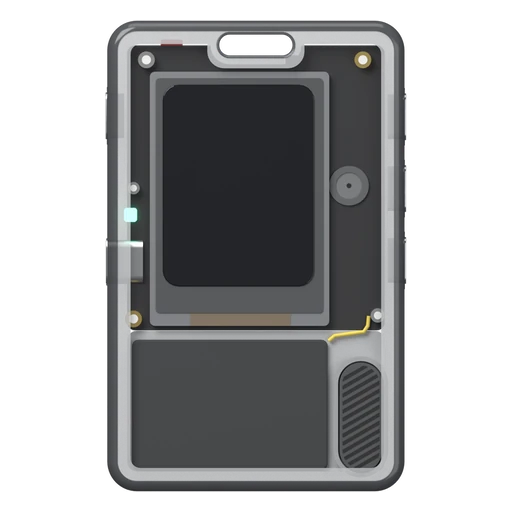
FoloToy Passport
Three physical keys (A, B, C) with live streamed transcription on screen.
- Default controls
- Hold B → Clip · Tap B → Memo · Chat tab asks Italic
- Audio & sync
- Streams live over BLE to iPhone (no on-device audio)
- Setup & updates
- One-click Web or Mac USB-C installer + BLE OTA updates
Screen devices
- FoloToy Passport (
passport): compact screen recorder with three physical keys (A, B and C). Hold B for a Clip, tap B to start and stop a Memo, and ask Italic Chat from its Chat tab. - Waveshare AMOLED 1.75C (
waveshare): USB-powered circular466 × 466AMOLED touch recorder (ESP32-S3-Touch-AMOLED-1.75C). Tap the red microphone button, then choose Save Clip or Save Memo, or ask Italic Chat on its screen. - M5Stack StackChan
(
m5stack-stackchan): motorized desktop AI companion (K151) with a2.0"320 × 240touch screen, capacitive top-of-head touch (hold for a Clip, tap for a Memo), pan/tilt servos and RGB base ring. - M5Stack CoreS3 (
m5stack-cores3): standalone2.0"320 × 240touch cube (K128) with dual microphones. Tap the red microphone button, then choose Save Clip or Save Memo. - M5Stack StopWatch
(
m5stack-stopwatch): pocket round466 × 466AMOLED touch recorder (C152) with haptic feedback and physical rim buttons. Hold or tap the upper-right blue button (B), or use the touch screen. - M5Stack Cardputer-Adv
(
m5stack-cardputer-adv): pocket56-key QWERTY handheld with a1.14"landscape screen and1500 mAhbattery. Hold or tap GO or Space to speak, or type a question directly to Italic Chat. - M5Stack StickS3
(
m5stack-sticks3): compact20 gmagnetic voice stick (K150) with a1.14"portrait screen. Hold the front button for a Clip, tap it for a Memo, and use the side button to switch tabs and settings. - Waveshare AMOLED 2.06
(
waveshare-amoled-2_06): wrist smartwatch with a2.06"410 × 502curved AMOLED touch screen and dual microphones. Tap the red microphone button on screen or use the side BOOT button. - Waveshare e-Paper 1.54
(
waveshare-epaper-1_54): compact200 × 200matte e-paper badge (V2) with a recording indicator LED. Hold BOOT for a Clip, tap BOOT for a Memo, and hold PWR to switch tabs. - ESP32-S3-BOX-3
(
espressif-s3-box-3): USB-powered docked2.4"320 × 240desktop touch terminal with dual microphones. Tap the red microphone button on screen or use the BOOT button.
Screenless devices
- Atom EchoS3R
(
m5stack-atom-echos3r): USB-powered24 × 24 mmdesk microphone button cube. Hold the top button for a Clip, tap it for a Memo, and double-click to arm Ask Italic Chat or discard an active recording. - FoloToy MagicBox
(
folotoy-magicbox): compact voice module (M09) with dual physical buttons, a rotary knob andWS2812RGB LED cues. Hold KEY 0 for a Clip, tap KEY 0 for a Memo, and press KEY 1 to toggle Ask Italic Chat or discard an active recording. - ESP32-S3 + INMP441
(
espressif-headless-s3): open-hardware DIY reference build pairing anESP32-S3-DevKitC-1with anINMP441orICS-43434I2S digital microphone (plus an optional auxiliary button and piezo buzzer). Hold BOOT for a Clip and tap BOOT for a Memo.
Firmware source and optional manual build notes are maintained in ShopItalic/external. Firmware updates are listed in the FoloToy, Waveshare, M5Stack and Espressif changelogs.
How they work with Italic
Direct-Bluetooth devices such as Pebble Index 01 record to onboard flash and transfer audio to Italic on your iPhone over Bluetooth LE after you finish speaking—leaving the ring's storage read-only.
By contrast, the 13 Italic Live boards stream live audio over Bluetooth LE straight to the Italic app on your iPhone and store no audio on the device itself:
- Your iPhone receives the live audio over Bluetooth—streaming live words back onto screen devices while you speak, or signalling state via LED and tactile cues on screenless devices.
- Once a recording starts, it finishes even after your iPhone locks.
- Italic transcribes the recording on your iPhone, files it as a Clip or a Memo on Home, and syncs the text to your account so it appears in the web app and Italic for Mac too.
Audio isn't uploaded. Source audio stays on your iPhone under Keep recordings.
Set up a 3rd Party device
Install Italic Live firmware over USB-C
Plug your board into your computer with a USB-C data cable and flash it once—all future updates install wirelessly over Bluetooth from iPhone:
- In your browser: open
the web installer directory (or the
device's direct
app.italic.com/setup/<id>link from iPhone) in Chrome or Edge. Each/setup/<id>page also includes direct download links for the board's full USB.bin, wireless BLE OTA.bin, andmanifest.json. - In Italic for Mac: choose Italic → Set Up External Device… from
the menu bar and select your board from the list. Because all 12 supported
ESP32-S3 boards share Espressif's
0x303A:0x1001USB identifier, pick the matching board explicitly before flashing.
You only need a USB-C cable once; later updates download and install wirelessly over Bluetooth from your iPhone.
Pair in Italic on your iPhone
In the Italic app, open the Profile tab, tap Add device, and under
3rd Party choose your device (or send/copy its setup link straight from
that page to your Mac or PC first). Pick the nearby Italic … Bluetooth
device and give it a name. No pairing code is needed.
Clip or Memo
Every supported 3rd Party device maps its primary hold/Clip action (pushToTalk)
to Clip and its tap/Memo action (recordButton) to Memo out of the box,
and you can change either on the device's page (or through the API:
Device settings):
| Device | Clip out of the box (pushToTalk) | Memo out of the box (recordButton) |
|---|---|---|
| FoloToy Passport | Hold B | Tap B |
| Waveshare AMOLED 1.75C | Save Clip on screen | Save Memo on screen / BOOT |
| M5Stack StackChan | Hold top of head / Save Clip | Tap top of head / Save Memo |
| M5Stack CoreS3 | Save Clip on screen | Save Memo on screen |
| M5Stack StopWatch | Hold blue button (B) / Save Clip | Tap blue button (B) / Save Memo |
| M5Stack Cardputer-Adv | Hold GO or Space | Tap GO or Space |
| M5Stack StickS3 | Hold front button | Tap front button |
| Waveshare AMOLED 2.06 | Save Clip on screen / Hold BOOT | Save Memo on screen / Tap BOOT |
| Waveshare e-Paper 1.54 | Hold BOOT | Tap BOOT |
| ESP32-S3-BOX-3 | Save Clip on screen / Hold BOOT | Save Memo on screen / Tap BOOT |
| Atom EchoS3R | Hold top button | Tap top button |
| FoloToy MagicBox | Hold Talk button (KEY 0) | Tap Talk button (KEY 0) |
| ESP32-S3 + INMP441 | Hold BOOT / PTT button | Tap BOOT / PTT button |
Each device page also has Auto-delete shorter than (2 seconds by default) to discard accidental presses.
Updates, settings and account sync
- Wireless firmware updates: open Firmware update on the device's page
in Italic on iPhone to fetch verified updates on demand and install them over
Bluetooth LE, with SHA-256 and header verification and automatic rollback if
a startup check ever fails (you can also reinstall over USB-C or flash a
downloaded OTA
.binfile manually). - Device settings: adjust Stop a quiet Memo after and restart any
device from its page on iPhone; screen devices with backlights also offer
Screen sleep and Brightness on both the device and iPhone.
USB-powered devices (
Waveshare AMOLED 1.75C,ESP32-S3-BOX-3,Atom EchoS3R, andESP32-S3 + INMP441) show USB power rather than a battery percentage. - Your account and other iPhones: saved 3rd Party devices appear under 3rd Party in Devices across your iPhones, the web app and Italic for Mac. Rename or remove a device (to Removed devices) from its page. On a new iPhone, open the device's page to pair it over Bluetooth, or use Find to locate a powered-on device nearby.
Pebble Index 01
Direct-Bluetooth push-to-talk smart ring by Core Devices with read-only sync (no USB-C flashing needed).
FoloToy Passport
Three physical keys, live words on screen, Clips, Memos and Chat.
Waveshare AMOLED 1.75C
Circular AMOLED touch recorder with Clips, Memos and Chat.
M5Stack StackChan
Motorized desktop companion (K151) with touch screen, head-pat sensor, servos and RGB ring.
M5Stack CoreS3
Compact 2.0" touch cube (K128) with dual microphones, Clips, Memos and Chat.
M5Stack StopWatch
Round 466 × 466 AMOLED pocket recorder (C152) with rim buttons and haptics.
M5Stack Cardputer-Adv
Pocket 56-key QWERTY deck with push-to-talk voice and typed Italic Chat.
M5Stack StickS3
Lightweight 20 g magnetic voice stick (K150) with portrait LCD and physical buttons.
Waveshare AMOLED 2.06
Wrist smartwatch with 2.06" curved AMOLED touch display and dual microphones.
Waveshare e-Paper 1.54
Daylight-readable 200 × 200 e-paper badge (V2) with instant status LED.
ESP32-S3-BOX-3
USB-powered docked 2.4" desktop touch terminal with dual microphones.
Atom EchoS3R
Tiny 24 mm USB-powered screenless desk microphone cube with one tactile button.
FoloToy MagicBox
Screenless companion (M09) with dual physical buttons, rotary knob and RGB LED cues.
ESP32-S3 + INMP441
Open-hardware DIY screenless reference build with ESP32-S3-DevKitC-1 and INMP441.
Web installer & downloads
One-click USB-C installers plus direct factory USB and BLE OTA .bin downloads for all 13 boards.
ShopItalic/external
Italic Live firmware source and optional manual build instructions for all 13 supported boards.